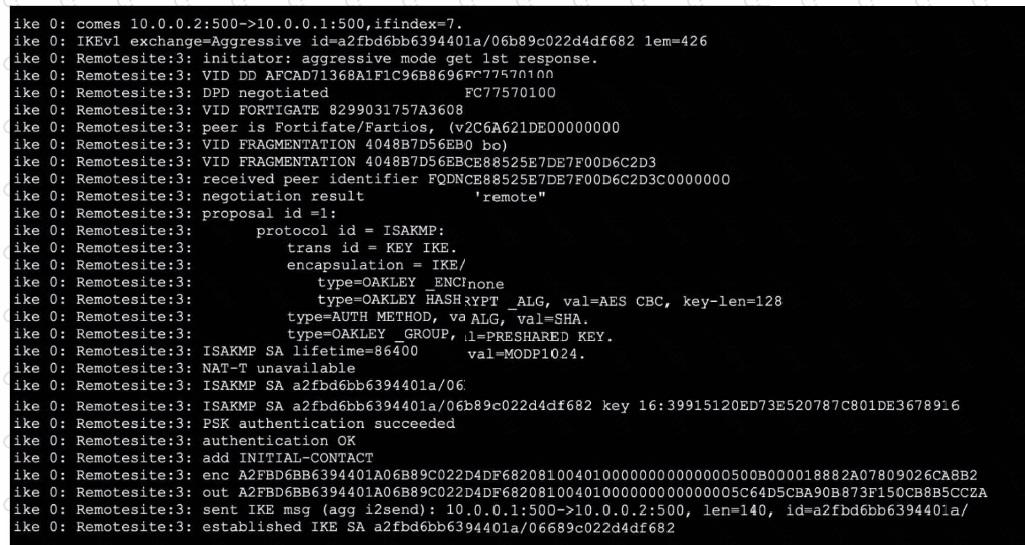
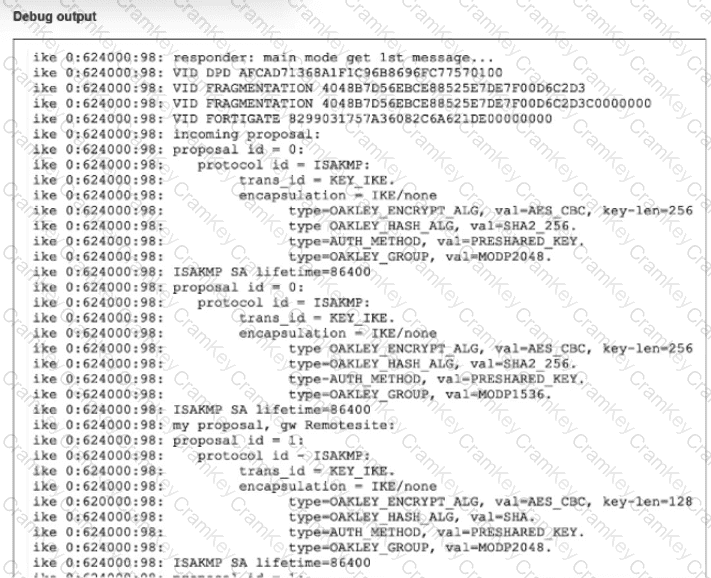
To determine the correct conclusions, we analyze the specific lines in the IKE real-time debug output provided in the exhibit:
Analysis for Option A (The remote peer is the initiating peer):
Evidence: The very first line of the debug output reads: ike 0:624000:98: responder: main mode get 1st message...
The keyword responder indicates that this local FortiGate is receiving the connection request. Consequently, the remote peer must be the initiator sending the request. The phrase " get 1st message " confirms the local unit is receiving the initial packet of the negotiation sequence.
Conclusion: This statement is True.
Analysis for Option B (This is a phase 1 negotiation):
Evidence: The same line mentions main mode.
In IPsec VPNs, Main Mode and Aggressive Mode are exclusively used for Phase 1 (IKE SA) negotiations. Phase 2 (Child SA) negotiations use Quick Mode. The presence of " main mode " definitively identifies this as a Phase 1 exchange.
Conclusion: This statement is True.
Analysis for Option C (There is a Diffie-Hellman group mismatch):
Evidence:
Incoming proposal (Remote): Lists type=OAKLEY_GROUP, val=MODP2048 (Group 14) in the first proposal proposal.
My proposal (Local): Lists type=OAKLEY_GROUP, val=MODP2048 (Group 14).
Since both the remote peer and the local gateway support and are proposing MODP2048 (Group 14), there is no Diffie-Hellman group mismatch. The actual mismatch visible in the logs is between the Encryption/Hash algorithms (Remote proposes AES-256/SHA2-256, while Local proposes AES-128/SHA), but the DH groups match.
Conclusion: This statement is False.
Analysis for Option D (This is a phase 2 negotiation):
As established in the analysis for Option B, " Main Mode " is a Phase 1 protocol. If this were Phase 2, the debug would show " Quick Mode " .
Conclusion: This statement is False.
[Reference:, FortiGate Security 7.6 Study Guide (IPsec VPN): "Phase 1 modes: Main mode and Aggressive mode.", FortiOS Debugging documentation: Explains that "responder" indicates the device receiving the IKE initialization., , , ]