Step 1: Verify the existing configuration on R11
enable
show ip interface brief
show vrf
show running-config interface Tunnel0
show running-config interface Ethernet0/1
show ip route
Confirm that the FINANCE VRF already exists and that the ISP-facing interface can reach R22.
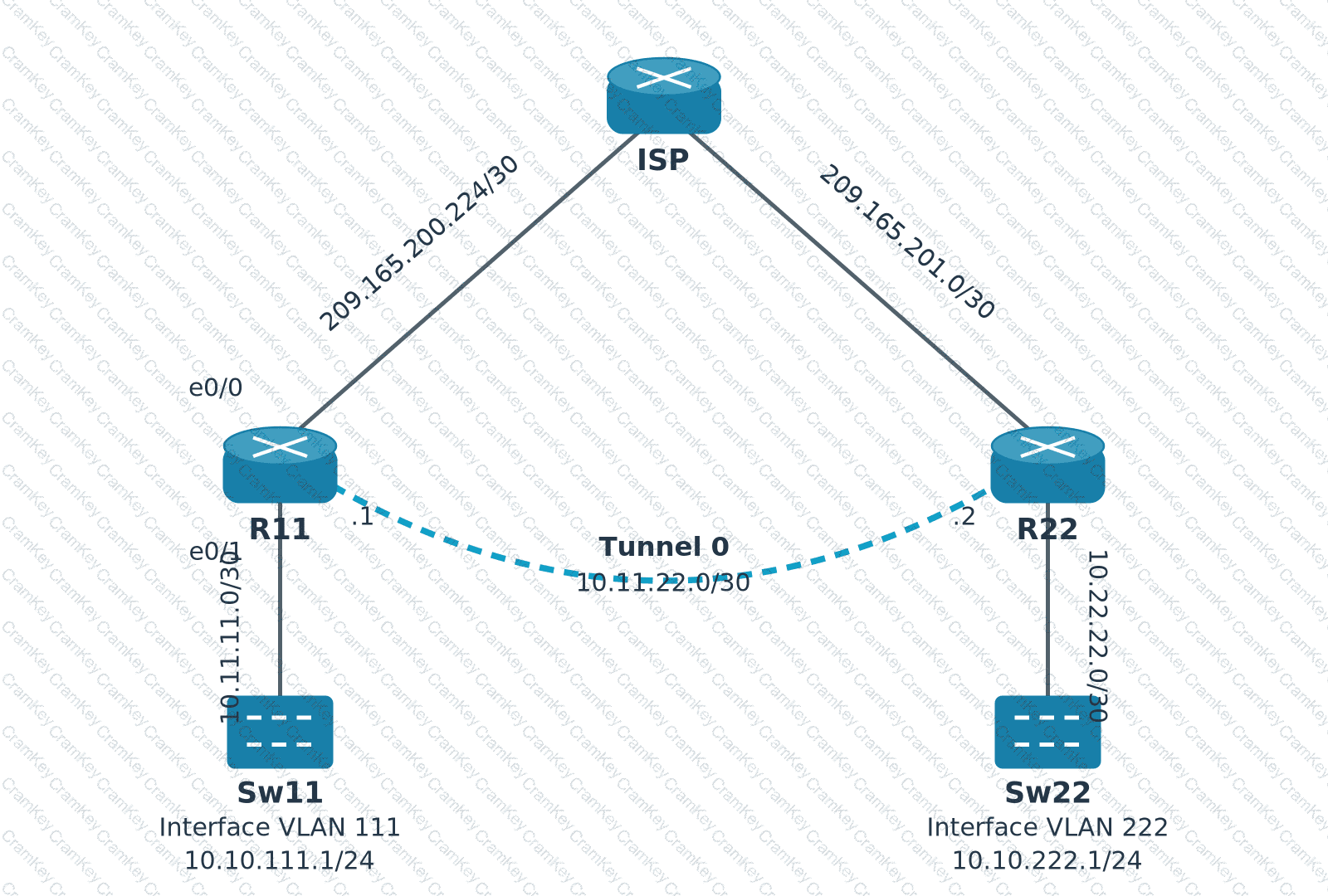
The topology indicates the following addressing:
Device/interface
IP address
R11 Ethernet0/0
209.165.200.226/30
R11 Ethernet0/1
10.11.11.1/30
R11 Tunnel0
10.11.22.1/30
R22 Tunnel0
10.11.22.2/30
R22 external interface
209.165.201.2/30
Sw11 transit interface
10.11.11.2/30
Sw11 VLAN111
10.10.111.1/24
Sw22 VLAN222
10.10.222.1/24
Step 2: Configure the FINANCE VRF
If the VRF is not already configured:
configure terminal
vrf definition FINANCE
address-family ipv4
exit-address-family
exit
Step 3: Configure the GRE tunnel on R11
interface Tunnel0
vrf forwarding FINANCE
ip address 10.11.22.1 255.255.255.252
tunnel source Ethernet0/0
tunnel destination 209.165.201.2
tunnel mode gre ip
no shutdown
exit
The tunnel interface belongs to the FINANCE VRF, while the tunnel transport uses the global routing table unless a separate transport VRF is explicitly configured.
Step 4: Configure the internal interface
interface Ethernet0/1
vrf forwarding FINANCE
ip address 10.11.11.1 255.255.255.252
no shutdown
exit
Important: Applying vrf forwarding to an interface removes its existing IP address. Therefore, the IP address must be configured again after assigning the VRF.
Step 5: Configure VRF-aware static routing
ip route vrf FINANCE 10.10.222.0 255.255.255.0 10.11.22.2
ip route vrf FINANCE 10.10.111.0 255.255.255.0 10.11.11.2
end
copy running-config startup-config
The first route directs traffic destined for the remote FINANCE network through the GRE tunnel. The second route provides reachability to the local VLAN111 network through Sw11.
Step 6: Verify Sw11 routing
If a route to the remote FINANCE network is not already present on Sw11, configure it as follows, assuming Sw11 uses its global routing table:
configure terminal
ip route 10.10.222.0 255.255.255.0 10.11.11.1
end
copy running-config startup-config
If Sw11 already has the required default route or static route, no additional modification is necessary.
Step 7: Verify the solution
On R11:
show vrf
show ip interface brief
show interfaces Tunnel0
show ip route vrf FINANCE
ping 209.165.201.2
ping vrf FINANCE 10.11.22.2
ping vrf FINANCE 10.10.222.1
On Sw11:
ping 10.10.222.1 source 10.10.111.1
Expected results:
• Tunnel0 is operational.
• Ethernet0/1 and Tunnel0 belong to FINANCE.
• The FINANCE routing table contains the required local and remote networks.
• End-to-end communication succeeds, provided that R22 and Sw22 have the required reciprocal configuration.
The configuration follows the displayed topology, not the conflicting original command example. Verify R11’s external address and remote endpoint before applying the tunnel.
Study Guide Reference: Cisco Press Portable Command Guide, Chapter 13 — Overlay Tunnels and VRF, GRE Tunnels, pages 325–330; VRF-Lite, pages 343–345.