Step 1: Verify R3 interface addressing
enable
show ip interface brief
show ip route connected
show running-config | section router bgp
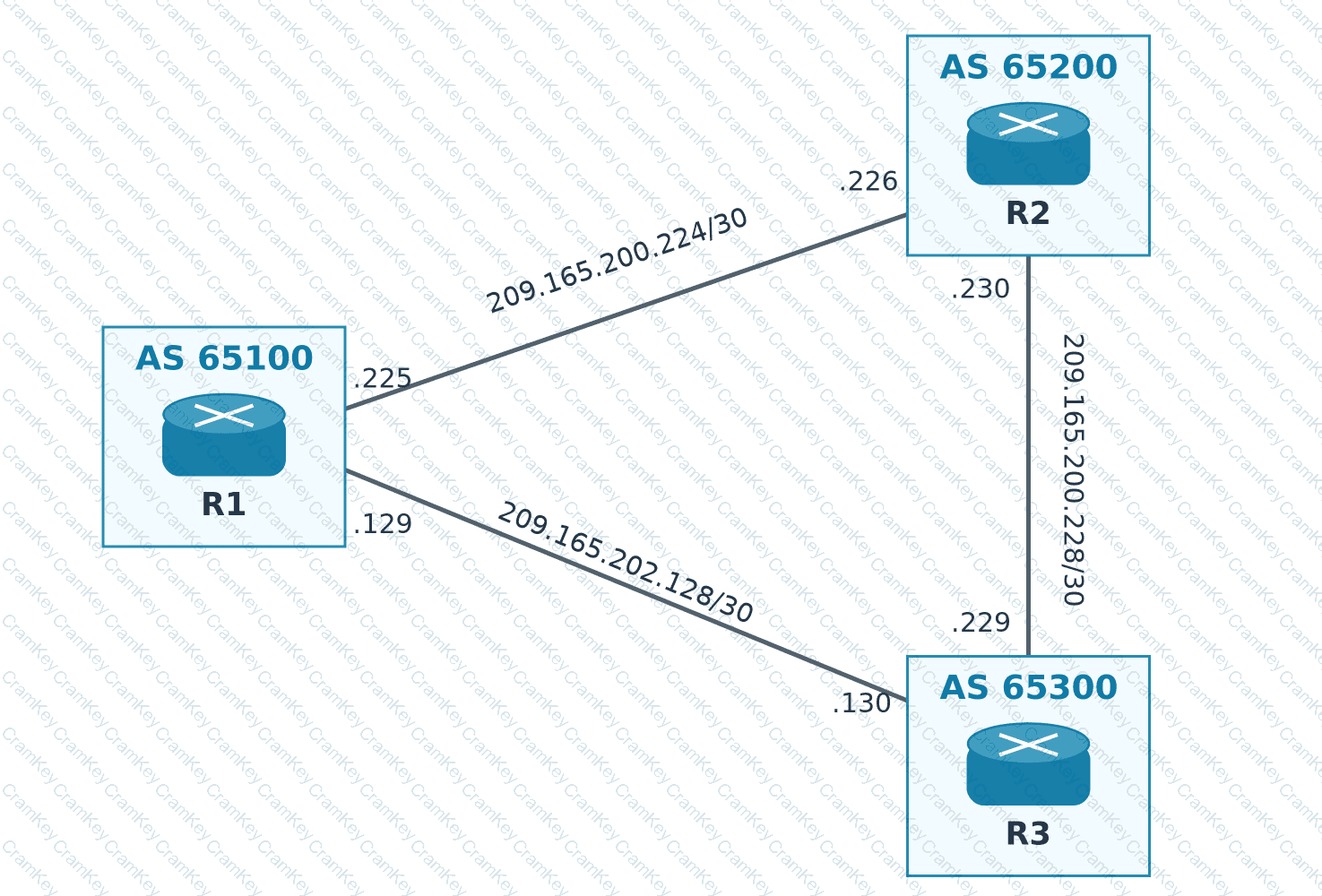
The existing simulation solution lists the following interface addresses on R3:
Interface
IP address
Ethernet0/0
209.165.202.130
Ethernet0/1
209.165.200.229
Loopback0
192.168.3.3
Loopback1
209.165.201.11
Loopback2
209.165.201.12
The required BGP neighbors are:
Neighbor
IP address
Remote AS
R1
209.165.202.129
65100
R2
209.165.200.230
65200
R3 belongs to autonomous system 65300.
Step 2: Configure the BGP routing process
configure terminal
router bgp 65300
bgp router-id 192.168.3.3
bgp log-neighbor-changes
no bgp default ipv4-unicast
neighbor 209.165.202.129 remote-as 65100
neighbor 209.165.200.230 remote-as 65200
The no bgp default ipv4-unicast command disables automatic IPv4 unicast activation, allowing the required neighbors to be explicitly activated under the address family.
Step 3: Configure the IPv4 address family
address-family ipv4 unicast
neighbor 209.165.202.129 activate
neighbor 209.165.200.230 activate
network 192.168.3.3 mask 255.255.255.255
network 209.165.201.11 mask 255.255.255.255
network 209.165.201.12 mask 255.255.255.255
exit-address-family
end
copy running-config startup-config
The loopback addresses are assumed to be configured as /32 host routes. Confirm their actual masks using show ip route connected and adjust the BGP network statements if necessary.
Step 4: Verify BGP neighbor relationships
show ip bgp summary
show ip bgp neighbors
The expected neighbor relationships are:
Neighbor
Remote AS
Expected state
209.165.202.129
65100
Established
209.165.200.230
65200
Established
An established BGP session normally displays a received-prefix count in the State/PfxRcd column rather than the word Established .
Step 5: Verify advertised networks
show ip bgp
show ip bgp neighbors 209.165.202.129 advertised-routes
show ip bgp neighbors 209.165.200.230 advertised-routes
Both neighbors should receive the following locally originated prefixes:
192.168.3.3/32
209.165.201.11/32
209.165.201.12/32
Complete R3 configuration
configure terminal
router bgp 65300
bgp router-id 192.168.3.3
bgp log-neighbor-changes
no bgp default ipv4-unicast
neighbor 209.165.202.129 remote-as 65100
neighbor 209.165.200.230 remote-as 65200
address-family ipv4 unicast
neighbor 209.165.202.129 activate
neighbor 209.165.200.230 activate
network 192.168.3.3 mask 255.255.255.255
network 209.165.201.11 mask 255.255.255.255
network 209.165.201.12 mask 255.255.255.255
exit-address-family
end
write memory
Technical correction: The configuration entered in the video does not explicitly use the required address-family configuration mode and omits the advertisement of Loopback0. Establishing BGP neighbor relationships alone does not satisfy both tasks. The corrected configuration addresses these omissions.
Study Guide Reference: Cisco Press Portable Command Guide, Chapter 7 — Configuring BGP, Multiprotocol BGP and Address Families, pages 156–159; Verifying BGP, page 174. ENCOR CCNP and CCIE Enterprise Core, Chapter 3 — BGP Configuration and Verification, pages 112–119.