| Exam Name: | Configuring and Operating Microsoft Azure Virtual Desktop | ||
| Exam Code: | AZ-140 Dumps | ||
| Vendor: | Microsoft | Certification: | Microsoft Certified: Windows Virtual Desktop Specialty |
| Questions: | 313 Q&A's | Shared By: | gurfateh |
You have an Azure subscription named Sub1 that contains an Azure Virtual Desktop deployment and the resources shown in the following table.
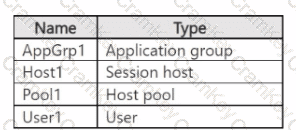
You need to enable Azure Virtual Desktop peruser access pricing for User1. At which level should you enable peruser access pricing?
You have an Azure Active Directory Domain Services (Azure AD D5) domain named contoso.com.
You have an Azure Storage account named storage1. Storage1 hosts a file share named share1 that has share and file system permissions configured. Share1 is configured to use contoso.com for authentication,
You create an Azure Virtual Desktop host pool named Pool1. Pool1 contains two session hosts that use the Windows 10 multi-session + Microsoft 365 Apps image.
You need to configure an FSLogix profile container for Pool1.
What should you do next?
Note: This question is part of a series of questions that present the same scenario. Each question in the series contains a unique solution that might meet the stated goals. Some question sets might have more than one correct solution, while others might not have a correct solution.
After you answer a question in this section, you will NOT be able to return to it. As a result, these questions will not appear in the review screen.
You have an Azure Virtual Desktop deployment.
You need to ensure that users are signed out automatically when they disconnect from a session.
Solution: From the Local Group Policy Editor, you configure the Session Time Limits settings.
Does this meet the goal?
Note: This question is part of a series of questions that present the same scenario. Each question in the series contains a unique solution that might meet the stated goals. Some question sets might have more than one correct solution, while others might not have a correct solution.
After you answer a question in this section, you will NOT be able to return to it. As a result, these questions will not appear in the review screen.
You have a Windows Virtual Desktop host pool named Pool1 that is integrated with an Azure Active Directory Domain Services (Azure AD DS) managed domain.
You need to configure idle session timeout settings for users that connect to the session hosts in Pool1.
Solution: From the Azure portal, you modify the Session behavior settings in the RDP Properties of Pool1.
Does that meet the goal?

TESTED 28 Oct 2026

