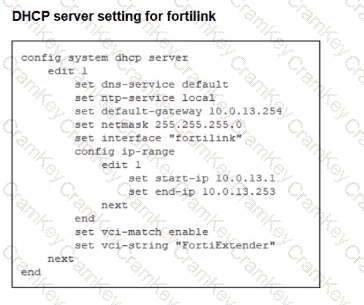
From the exhibit, the DHCP server configured on the fortilink interface contains:
set vci-match enable
set vci-string " FortiExtender "
That is the key problem. This DHCP scope is tied to a Vendor Class Identifier match for FortiExtender, not FortiSwitch. As a result, the FortiSwitch will not match the DHCP offer and may fail to receive an IP address on the FortiLink network, which prevents FortiGate from discovering and managing it.
The LAN Edge 7.6 Architect study guide says that for FortiLink troubleshooting, you must verify DHCP on the FortiLink interface and confirm the switch receives an IP address:
“On FortiGate verify that DHCP is enabled for the FortiLink interface” and on FortiSwitch “Verify that the interface is getting an IP address from FortiLink”
It also says to use:
#execute switch-controller diagnose-connection for “Interface, DHCP, and NTP connection status”
#get system interface on FortiSwitch to verify that it is getting an IP address from FortiLink
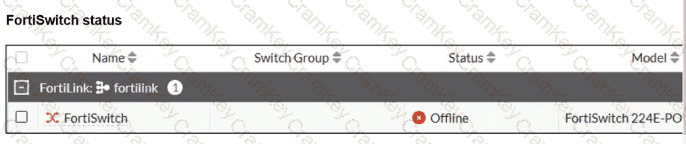
So if the switch stays offline and cabling is correct, DHCP mismatch is a valid root cause.
Further confirmation comes from the FortiOS Administration Guide, which explains VCI-based DHCP assignment:
“VCIs (vendor class identifiers) are supported in DHCP to allow VCI pattern matching as a condition for IP or DHCP option assignment.”
It also states:
“When enabled only DHCP requests with a matching VCI are served with this range.”
That matches this scenario exactly. Because the DHCP pool is restricted to vci-string " FortiExtender " , a FortiSwitch DHCP request will not match that pool.
Why the other options are incorrect:
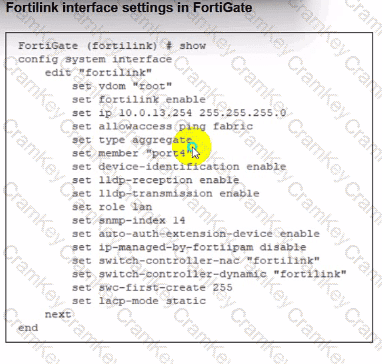
A. Incorrect. ip-managed-by-fortiipam disable is shown in the FortiLink interface exhibit, but the study guide does not identify this as a requirement for FortiSwitch discovery. It is not the reason the switch would remain offline here.
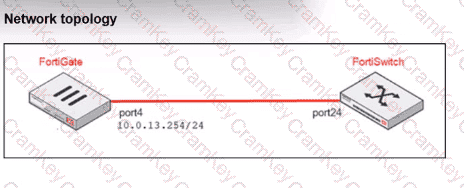
B. Incorrect. The FortiLink interface member is port4, and the topology exhibit shows the FortiGate connected from port4 to the FortiSwitch port24. That matches the physical topology, so the interface member is not the issue.
C. Incorrect. The study guide explicitly says the FortiLink interface is a LAG by default:
“All FortiGate devices come with a factory default FortiLink interface... By default, the interface is created as a link aggregation group (LAG) interface.”
So type aggregate is normal and valid. It does not need to be physical.
Final verified conclusion:
The FortiSwitch remains offline because the DHCP server on the FortiLink interface is configured with the wrong VCI match string, FortiExtender, which prevents the FortiSwitch from obtaining an IP address from FortiLink.
So the correct answer is D.