Comprehensive and Detailed Explanation
HPE Press guide context | PDF page 1007 | HPE Press, Aruba Certified Associate – Campus Access Official Certification Study Guide
Technical Deep Dive — Original Chat Wording
The HPE Aruba Networking CX 6200M uses front-panel status indicators to communicate hardware health and operating conditions.
The Global Status Indicator LED provides a quick visual indication of the switch's overall operational status.
A flashing amber indication means the switch has detected a recoverable fault.
Examples include certain fan or power-supply problems that require administrator attention but do not necessarily prevent the switch from continuing to operate.
The LED patterns distinguish operational states:
Flashing green: Self-test in progress
Solid green: AOS-CX booted successfully
Flashing amber: Recoverable fault
Solid amber: Critical fault
When flashing amber is observed, administrators should investigate the underlying condition rather than immediately assuming firmware corruption.
Relevant troubleshooting commands include:
show system
show environment
show events -r
These commands help identify hardware health conditions and recent system events, subject to platform and software-version support.
For example, a failed redundant component may generate an alert while the switch continues forwarding traffic.
However, a recoverable fault must still be investigated because continued operation with reduced hardware redundancy can increase the risk of an outage.
Option A and Option B correspond to other startup-related conditions.
Option C describes a possible boot failure, not the defined flashing-amber indication.
Therefore, Option D is correct.
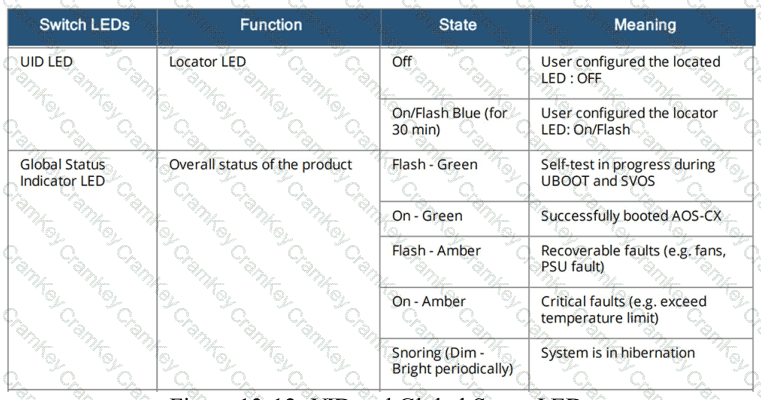
HPE Press study-guide figure / related learning illustration · Fig 13-12 Global Status LED