Comprehensive and Detailed Explanation
HPE Press guide context | PDF page 231 | HPE Press, Aruba Certified Associate – Campus Access Official Certification Study Guide
Technical Deep Dive — Original Chat Wording
The AOS-CX routing table identifies how the switch reaches remote IP networks.
Each routing entry can contain the destination prefix, route source, next-hop address, administrative distance, and routing metric.
Consider the specified entry:
10.1.20.0/24 via 10.1.12.2 [1/0]
The destination network is 10.1.20.0/24 .
The next-hop address is 10.1.12.2 .
The square-bracket notation represents the administrative distance followed by the route metric.
In this example:
1: Administrative distance
0: Route metric
Under the standard AOS-CX defaults, static routes have an administrative distance of 1.
By comparison, directly connected routes have a default administrative distance of 0, and OSPF routes have a default administrative distance of 110.
A static route is configured manually rather than learned through a dynamic routing protocol.
A representative configuration is:
configure terminal
ip route 10.1.20.0/24 10.1.12.2
Administrators can examine static routing information using:
show ip route
show ip route static
Administrative distance can be customized, so it should not be considered an infallible route-origin identifier in every configuration.
However, the displayed [1/0] values match the ordinary AOS-CX static-route behavior described by the guide.
Therefore, Option C (static) is correct.
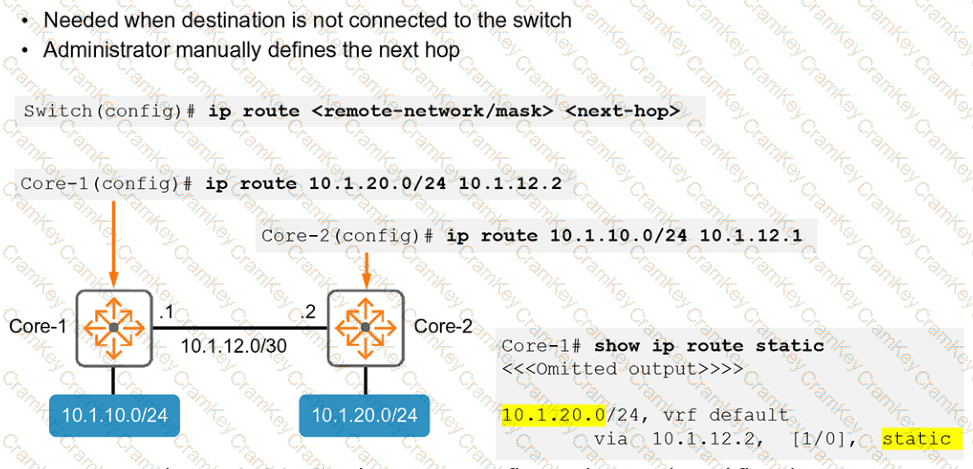
HPE Press study-guide figure / related learning illustration · Q149 Fig 3-20 Static