Comprehensive and Detailed Explanation From Fortinet SD-WAN 7.6 Architect / Course Guide:
FortiManager SD-WAN provisioning templates allow administrators to define installation targets for individual SD-WAN members. This enables a common template to accommodate branch devices with different WAN interfaces or overlay tunnel configurations.
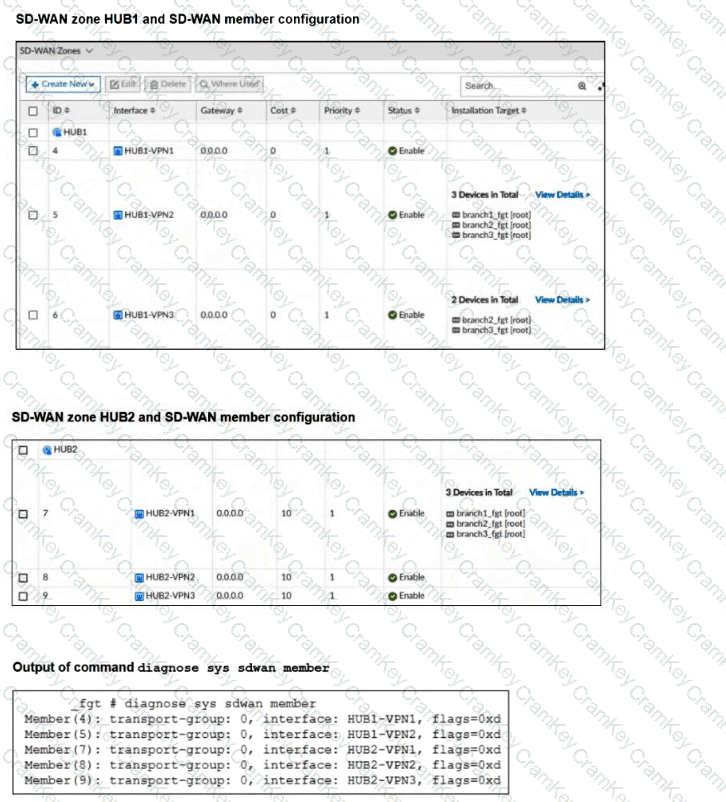
Option B is correct because the diagnostic output corresponds to branch1_fgt, based on the configured installation targets and the absence of SD-WAN member ID 6.
The HUB1 zone configuration shows:
HUB1-VPN1 (ID 4): No installation target restriction; deployed to all assigned devices.
HUB1-VPN2 (ID 5): Assigned to branch1_fgt, branch2_fgt, and branch3_fgt.
HUB1-VPN3 (ID 6): Assigned only to branch2_fgt and branch3_fgt.
The diagnostic output lists members 4, 5, 7, 8, and 9, but member 6 is absent.
This matches branch1_fgt because HUB1-VPN3 is not included in that device ' s installation targets.
Option A is incorrect because branch2_fgt should have member 6 installed.
Option C is incorrect because the absence of a member from the diagnostic output does not establish that it is dead; it may not be configured on that device.
Option D is incorrect because the output is consistent with the template ' s device-specific configuration.
The determining principle is that FortiManager installs SD-WAN members according to their installation targets, and an empty installation target applies the member to all devices assigned to the template.
[References: Fortinet SD-WAN 7.6 Core Administrator Study Guide, page 237, SD-WAN Member Installation Targets; FortiManager 7.6 Administration Guide — Zones and Interface Members., , , , ]