| Exam Name: | Developing AI-Enabled Database Solutions | ||
| Exam Code: | DP-800 Dumps | ||
| Vendor: | Microsoft | Certification: | Microsoft Certified: SQL AI Developer |
| Questions: | 61 Q&A's | Shared By: | cecily |
You have an Azure SQL database that supports a customer-facing API. The API calls a stored procedure named dbo.GetCustomerOrders thousands of times per hour.
After a deployment that updated indexes and statistics, users report that the API endpoint backed by dbo.Getcustomerorders is slower. In Query Store, the same query now has two persisted execution plans. During the last hour, the newer plan had a significantly higher average duration and CPU time than the older plan.
You need to restore the previous performance quickly, without changing the API code.
Which Transact-SQL command should you run?
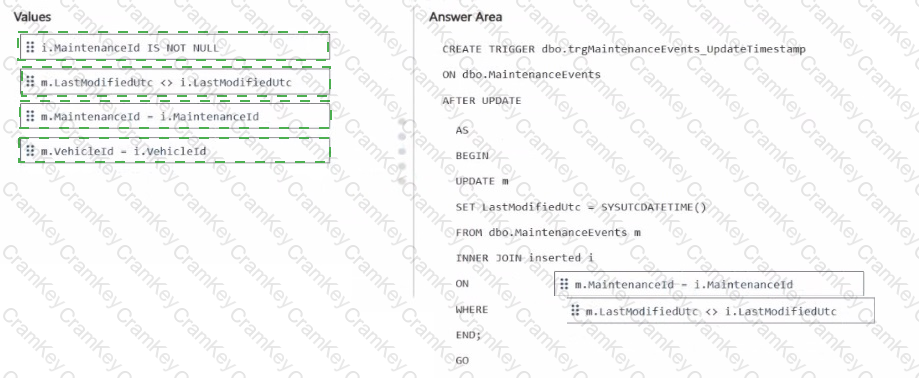
You have an Azure SQL database that contains a table named dbo.Orders.
You have an application that calls a stored procedure named dbo.usp_tresteOrder to insert rows into dbo.Orders.
When an insert fails, the application receives inconsistent error details.
You need to implement error handling to ensure that any failures inside the procedure abort the transaction and return a consistent error to the caller.
How should you complete the stored procedure? To answer, drag the appropriate values to the correct targets, tach value may be used once, more than once, or not at all. You may need to drag the split bar between panes or scroll to view content.
NOTE: Each correct selection is worth one point.
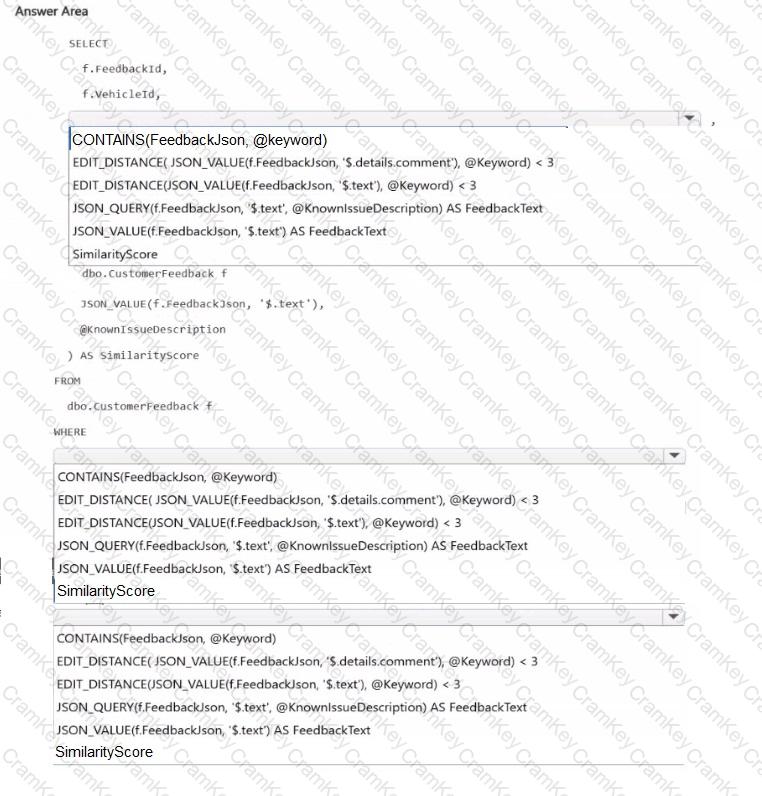
You have an Azure SQL database that supports the OLTP workload of an order-processing application.
During a 10-minute incident window, you run a dynamic management view query and discover the following:
Session 72 is sleeping with open_transaction_count = 1.
Multiple other sessions show blocking_session_id = 72 in sys.dm_exec_requests.
sys.dm_exec_input_buffer(72, NULL) returns only BEGIN TRANSACTION UPDATE Sales.Orders.
Users report that updates to Sales.Orders intermittently time out during the incident window. The timeouts stop only after you manually terminate session 72.
What is a possible cause of the blocking?
You have an Azure SQL database that has Query Store enabled
Query Performance Insight shows that one stored procedure has the longest runtime. The procedure runs the following parameterized query.

The dbo.orders table has approximately 120 million rows. Customer-id is highly selective, and orderOate is used for range filtering and sorting.
Vou have the following indexes:
• Clustered index: PK_Orders on (Orderld)
• Nonclustered index: lx_0rders_order-Date on (OrderDate) with no included columns
An actual execution plan captured from Query Store for slow runs shows the following:
• An index seek on ixordersorderDate followed by a Key Lookup (Clustered) on PKOrders for customerid, status, and TotalAnount
• A sort operator before top (50), because the results are ordered by orderDate DESC
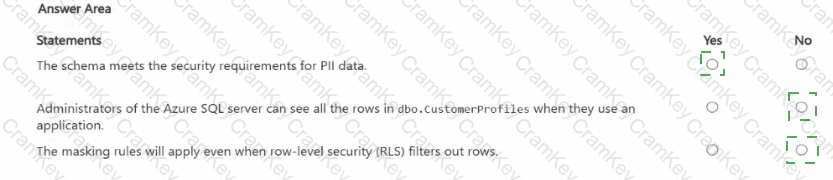
For each of the following statements, select Yes if the statement is true. Otherwise, select No. NOTE: Each correct selection is worth one point.