| Exam Name: | Certified Kubernetes Security Specialist (CKS) | ||
| Exam Code: | CKS Dumps | ||
| Vendor: | Linux Foundation | Certification: | Kubernetes Security Specialist |
| Questions: | 64 Q&A's | Shared By: | hidayah |
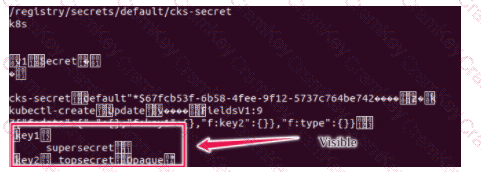
Secrets stored in the etcd is not secure at rest, you can use the etcdctl command utility to find the secret value
for e.g:-
ETCDCTL_API=3 etcdctl get /registry/secrets/default/cks-secret --cacert="ca.crt" --cert="server.crt" --key="server.key"
Output
Using the Encryption Configuration, Create the manifest, which secures the resource secrets using the provider AES-CBC and identity, to encrypt the secret-data at rest and ensure all secrets are encrypted with the new configuration.
Use the kubesec docker images to scan the given YAML manifest, edit and apply the advised changes, and passed with a score of 4 points.
kubesec-test.yaml
apiVersion: v1
kind: Pod
metadata:
name: kubesec-demo
spec:
containers:
- name: kubesec-demo
image: gcr.io/google-samples/node-hello:1.0
securityContext:
readOnlyRootFilesystem: true
Hint: docker run -i kubesec/kubesec:512c5e0 scan /dev/stdin < kubesec-test.yaml
Create a Pod name Nginx-pod inside the namespace testing, Create a service for the Nginx-pod named nginx-svc, using the ingress of your choice, run the ingress on tls, secure port.
Enable audit logs in the cluster, To Do so, enable the log backend, and ensure that
1. logs are stored at /var/log/kubernetes-logs.txt.
2. Log files are retained for 12 days.
3. at maximum, a number of 8 old audit logs files are retained.
4. set the maximum size before getting rotated to 200MB
Edit and extend the basic policy to log:
1. namespaces changes at RequestResponse
2. Log the request body of secrets changes in the namespace kube-system.
3. Log all other resources in core and extensions at the Request level.
4. Log "pods/portforward", "services/proxy" at Metadata level.
5. Omit the Stage RequestReceived
All other requests at the Metadata level

TESTED 07 Oct 2026

