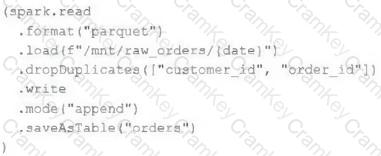
Databricks documents that expectation decorators are applied to datasets using decorators such as @dp.expect , @dp.expect_or_drop , and related variants. The expect_or_drop behavior drops records that violate the constraint before they are written to the target dataset. That matches the requirement exactly. ( Databricks Documentation )
Option D is the only answer that uses the documented decorator pattern correctly and applies drop semantics for both constraints. Options B and C use expect , which records the violation but does not drop invalid records. Option A is not the documented API pattern for Lakeflow expectations, because expectations are declared as decorators on the table or view definition rather than chained as DataFrame methods. ( Databricks Documentation )
======
QUESTION NO: 36
A data engineer is creating a data ingestion pipeline to understand where customers are taking their rented bicycles during use. The engineer noticed that over time, data being transmitted from the bicycle sensors fails to include key details like latitude and longitude. Downstream analysts need both the clean records and the quarantined records available for separate processing.
The data engineer already has this code:
import dlt
from pyspark.sql.functions import expr
rules = {
" valid_lat " : " (lat IS NOT NULL) " ,
" valid_long " : " (long IS NOT NULL) "
}
quarantine_rules = " NOT({0}) " .format( " AND " .join(rules.values()))
@dlt.view
def raw_trips_data():
return spark.readStream.table( " ride_and_go.telemetry.trips " )
How should the data engineer meet the requirements to capture good and bad data?
A.
@dlt.table(partition_cols=[ " is_quarantined " ])
@dlt.expect_all(rules)
def trips_data_quarantine():
return (
spark.readStream.table( " raw_trips_data " )
withColumn( " is_quarantined " , expr(quarantine_rules))
)
B.
@dlt.table
@dlt.expect_all_or_drop(rules)
def trips_data_quarantine():
return spark.readStream.table( " raw_trips_data " )
C.
@dlt.table(name= " trips_data_quarantine " )
def trips_data_quarantine():
return (
spark.readStream.table( " raw_trips_data " )
filter(expr(quarantine_rules))
)
D.
@dlt.view
@dlt.expect_or_drop( " lat_long_present " , " (lat IS NOT NULL AND long IS NOT NULL) " )
def trips_data_quarantine():
return spark.readStream.table( " ride_and_go.telemetry.trips " )
Answer: A
Databricks documents a quarantine pattern for Lakeflow Spark Declarative Pipelines in which you create a dataset containing both valid and invalid rows, add an is_quarantined flag based on your rule set, and then use that dataset for separate downstream processing paths. The documented pattern uses a boolean quarantine expression and preserves all rows while tracking quality metrics through expectations. ( Databricks Documentation )
Option A is the only choice that matches that documented design: it keeps all records, marks invalid rows with is_quarantined , and applies expectations to capture data quality metrics. Option B drops invalid rows, which fails the requirement to keep quarantined records available. Option C captures only bad rows and loses the clean path. Option D also drops invalid rows and therefore does not preserve both good and quarantined records for separate downstream use. ( Databricks Documentation )
======
QUESTION NO: 42
A data team is implementing an append-only Delta Lake pipeline that needs to handle both batch and streaming data. They want to ensure that schema changes in the source data can be automatically incorporated without breaking the pipeline. Which configuration should the team use when writing data to the Delta table?
A. validateSchema = false
B. ignoreChanges = false
C. overwriteSchema = true
D. mergeSchema = true
Answer: D
Databricks documents mergeSchema as the write option used to enable schema evolution when appending data to Delta tables. This allows new columns in the source to be automatically merged into the target schema rather than causing the write to fail. ( Databricks Documentation )
overwriteSchema is used with overwrite operations, not append-style schema evolution. validateSchema and ignoreChanges are not the correct configuration for this requirement. Because the pipeline is append-only and must tolerate source schema changes automatically, mergeSchema = true is the documented choice. ( Databricks Documentation )
======
QUESTION NO: 49
A data engineer needs to install the PyYAML Python package for YAML file processing within their Databricks environment. However, the Databricks workspace is air-gapped and does not have direct internet access to download packages from PyPI. The engineer has already downloaded the required PyYAML wheel ( .whl ) file onto their laptop. The data engineer wants to install the PyYAML package from the local wheel file so that it is automatically available whenever any new cluster is provisioned in their Databricks workspace. Which approach should the data engineer use?
A. Upload the PyYAML.whl file to a Unity Catalog volume. Add the path to the Unity Catalog allowlist if required. Then create a cluster-scoped init script that executes pip install /path/to/PyYAML.whl .
B. Set up a private PyPI repository, register the wheel there, and create a cluster-scoped init script that executes /databricks/python/bin/pip install --index-url=https://{repo-url} PyYAML on the cluster.
C. Upload the PyYAML.whl file under the data engineer’s user home directory in the Workspace, and create a cluster-scoped init script that executes %pip install /path/to/PyYAML.whl on the shared cluster.
D. Add the PyYAML.whl file directly to Databricks Git Repos and assume that any cluster linked to the Repo will automatically have PyYAML installed from that file.
Answer: A
Databricks documents that libraries and init scripts can be sourced from Unity Catalog volumes, and for standard access mode, relevant paths can require Unity Catalog allowlist configuration. Databricks also documents that init scripts run on every cluster startup, which is the mechanism that makes a package automatically available whenever a new cluster is provisioned. ( Databricks Documentation )
Option A fits the air-gapped requirement because it does not depend on internet access and uses a startup-time installation mechanism. Option B still depends on reachable repository infrastructure. Option C is incorrect because %pip is notebook magic, not the correct form inside an init script. Option D is unsupported because storing a wheel in Git Repos does not automatically install it on cluster creation. ( Databricks Documentation )
======
QUESTION NO: 51
A data engineer is tasked with ensuring that a Delta table in Databricks continuously retains deleted files for 15 days instead of the default 7 days, in order to comply with the organization’s data retention policy. Which code snippet correctly sets this retention period for deleted files?
A.
spark.sql( " " "
ALTER TABLE my_table
SET TBLPROPERTIES ( ' delta.deletedFileRetentionDuration ' = ' interval 15 days ' )
" " " )
B.
from delta.tables import *
deltaTable = DeltaTable.forPath(spark, " /mnt/data/my_table " )
deltaTable.deletedFileRetentionDuration = " interval 15 days "
C.
spark.sql( " VACUUM my_table RETAIN 15 HOURS " )
D.
spark.conf.set( " spark.databricks.delta.deletedFileRetentionDuration " , " 15 days " )
Answer: A
Databricks documents delta.deletedFileRetentionDuration as a Delta table property and shows that Delta table properties are modified with SET TBLPROPERTIES . The documented value format is an interval expression such as ' interval 7 days ' , so ' interval 15 days ' is the correct way to set the retention window on the table itself. ( Databricks Documentation )
Option C controls a specific VACUUM run and is shown in hours here, not as a persistent table-level retention setting. Option D sets a Spark configuration rather than the table property required by the question. Option B is not the documented API for setting this Delta retention property. ( Databricks Documentation )
======
QUESTION NO: 52
A data engineer is designing a data pipeline in Databricks that needs to process records from a Kafka stream where late-arriving data is common. Which approach should the data engineer use?
A. Use a watermark to specify the allowed lateness to accommodate records that arrive after their expected window, ensuring correct aggregation and state management.
B. Use an Auto CDC pipeline with batch tables to simplify late data handling.
C. Use batch processing and overwrite the entire output table each time to ensure late data is incorporated correctly.
D. Implement a custom solution using Databricks Jobs to periodically reprocess all historical data.
Answer: A
Databricks and Apache Spark document watermarks as the standard mechanism for handling late-arriving data in Structured Streaming. A watermark defines how long the engine should continue waiting for out-of-order event-time data and helps manage state for aggregations, joins, and deduplication. ( Databricks Documentation )
This directly matches Kafka streaming scenarios where lateness is common. The other options are not the standard streaming solution for event-time late data: Auto CDC is for change data capture use cases, and repeated full historical reprocessing is inefficient and unnecessary when watermarking is the built-in feature designed for this problem. ( Databricks Documentation )
======