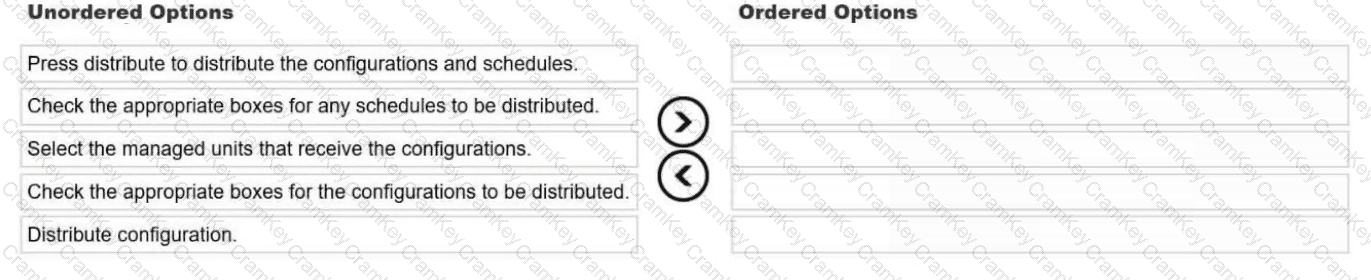
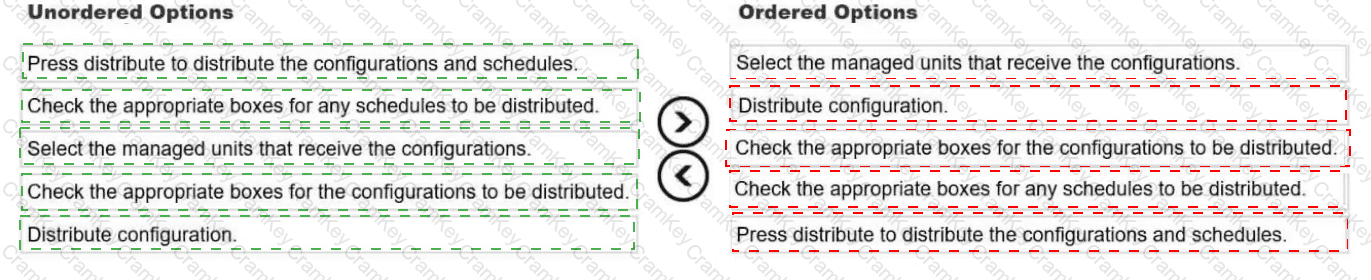
1. Select the managed units that receive the configurations.
2. Distribute configuration.
3. Check the appropriate boxes for the configurations to be distributed.
4. Check the appropriate boxes for any schedules to be distributed.
5. Press distribute to distribute the configurations and schedules.
The documented procedure is: "1. Select the managed units that receive the configurations. 2. Click Distribute Configurations to display the Distribute Configurations window. 3. Check the appropriate boxes for the configurations that you want to distribute. … 4. Check the appropriate boxes for any schedules that you want to distribute. … If a configuration is not scheduled, the check box is not available. 5. Click Distribute to distribute the configurations and schedules."
The sequence is dictated by the interface. The Distribute Configurations button is only active once at least one managed unit is selected. The configuration and schedule checkboxes exist only inside the window that button opens. A schedule can only be distributed for a configuration that has one, which is why the configuration boxes come before the schedule boxes.
No automatic restart: Distributing does not restart the managed units. To restart them, use the restart-unit icon for a single unit, or Restart Portal for all selected units.
After distribution: The Alerter needs a reboot of the managed units. Anomaly Detection and Session Inference need a restart of the managed units. Results Export, System Backup, Data Archive, Result Archive and Data Export need neither.