| Exam Name: | Dynatrace Associate Certification Exam | ||
| Exam Code: | Dynatrace-Associate Dumps | ||
| Vendor: | Dynatrace | Certification: | Dynatrace Associate Certification |
| Questions: | 82 Q&A's | Shared By: | bella-rose |
Welcome to the Practical section of your exam!
This portion of the exam requires you to configure and analyze various components within Dynatrace and is open book using Dynatrace documentation ONLY by opening a new tab. The Dynatrace Operator is already deployed for you in a Kubernetes environment (Linux host) in Cloud-Native Full-Stack. The easyTrade and easyTravel applications are also already deployed for you. You will most likely only interact with the Dynatrace Environment (SaaS Platform). For a majority of these questions: paste or attach your screen captures directly to the question using the image control.
Information for connecting to exam components is provided in Dynatrace University in your event classroom. Open the Associate Exam Event / Classroom and go to the Environments tab, https://universitv.dvnatrace.com/account/events
If you deem it necessary: you may use SSH through the built in terminal or through an SSH client of your choice. Use the IP address and credentials provided to log in to the Linux virtual machine running your Kubernetes cluster. When you SSH to the public IP and are presented with the credential prompt, enter the provided username and then the provided password.
Review these and additional instructions for connecting to your environment and creating screenshots by clicking 'View all questions' and then the 'Info' icon.
easyTravel Information
easyTravel is a multi-tier application implemented in .Net and Java. It provides a web portal which allows users to log in, search for journeys to various destinations, select promotional journeys that are offered, and to book a journey using credit card details. Additionally, a Business-to-Business (B2B) web portal for travel agencies is provided where travel agencies can manage the journeys that they offer and can review reports about created bookings.
easyTrade Information
easyTrade is also a multi-tier application that allows you to login as a fake user or even create a new user. After which point, you are able to buy and sell stocks or deposit money into your balance using fake information. These interactions will create transactions in Dynatrace for you to analyze. However, there is a load generator running which means that interacting with this page should not be necessary to answer the questions.
Tips for completing tasks:
1. Read each task carefully and fully before starting, and then follow the instructions to complete each task.
2. Be sure your screen captures match the requirements stated and are readable.
3. To create your screen captures, you can zoom your screen, or take multiple screenshots to show all the areas requested. You can attach multiple images to the same question. It is recommended to provide more proof than necessary and document your steps. When in doubt, the old saying "show your work", comes in handy.
4. Use a screen capture tool to create and then copy to your clipboard and paste screen captures directly into the file upload control. To upload a file, allowed file types for the upload are: Jpg, .jpeg, and .png.
5. When saving your images for upload into the test be sure that your image titles do not contain the following characters:!,-,_,.,",',(,).
6. To access the web portal, use the links found in the SSH terminal. They will be listed as soon as you login.
Tasks1:
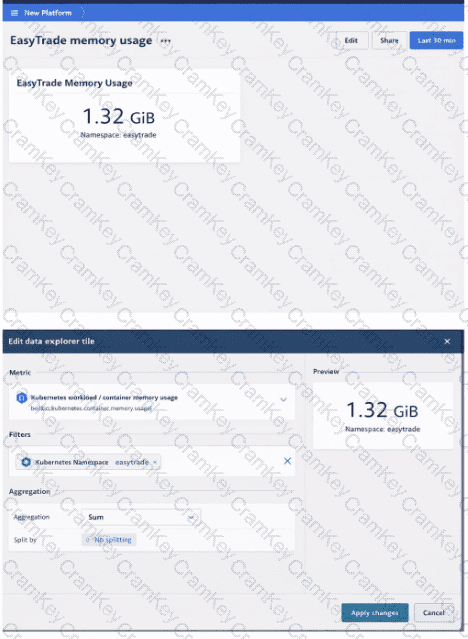
An application team needs to know how much memory their application, EasyTrade, is taking up in their Kubernetes cluster. They have to see the memory usage for all the pods running in the "easytrade' namespace, summed up into a single metric. Use a Dashboard in the new Platform interface (not Dashboards Classic) to show this information to the team and set the timeframe for this data to look at the last 30 minutes. Call this dashboard "EasyTrade memory usage".
Screen capture(s) required:
Upload image(s) that show the following:
1. A dashboard "EasyTrade memory usage".
2. The tile used to display memory usage for all pods in the "easytrade" namespace as well as its configuration.
What features should be used to get FULL visibility into a database's performance, including code-level analysis, and metric data? (Select all that apply)
I want to view versioning metadata of the components I monitor in Dynatrace. Which options do I have for configuring this data? (Select all that apply)
Which of these data sources can I utilize when a Kubernetes cluster is being monitored?

TESTED 16 Oct 2026